Inside the app
A closer look.


About this app
Made for a clear purpose.
VideoCropStudio is a Mac video cropping and batch export studio for turning source clips into social, feed, wide, square, portrait, and custom-ratio deliverables.
Import videos, choose a crop preset, preview the kept frame, trim the clip, adjust framing, rotate or flip, set codec, speed, audio, quality, frame rate, and safe-zone guides, then export a single clip or the entire queue.
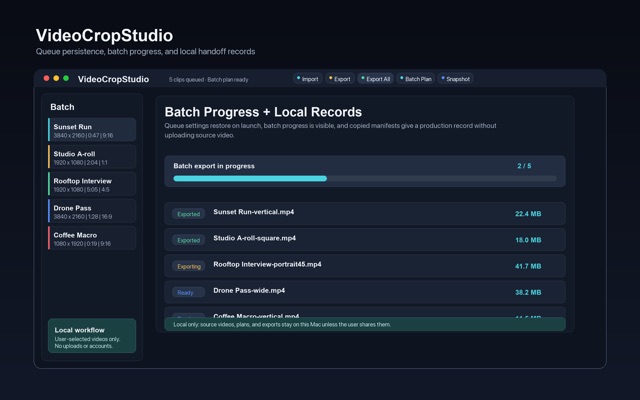
Version 2.5 adds Batch Export Plan, a preflight manifest for the whole queue. Before export, VideoCropStudio now shows each output file name, render size, duration, speed, codec, audio state, safe-zone guide, estimated size, and any clips that need attention. The manifest can be copied as Markdown for handoff notes or production records.
Core tools:
- Live crop preview with rule-of-thirds guide - Fill crop or Fit letterbox framing - Presets for vertical, portrait, square, wide, and cinema ratios - Custom aspect ratios - Drag-to-reposition crop anchor - Trim range selection - Rotate, flip, mute, speed, codec, quality, and frame-rate controls - Platform safe-zone guides - PNG frame snapshot export - Batch export with collision-safe output names - Batch Export Plan with copyable Markdown manifest - Local queue restoration with security-scoped bookmarks
VideoCropStudio runs locally on your Mac. It does not require an account and does not upload your videos.
SMART SUBJECT FRAMING (NEW IN 2.6) Stop guessing where to anchor the crop. Auto-Frame samples frames across your clip, finds the subject on device (faces first, visual attention as fallback), and slides the crop window onto it - with the detection boxes drawn right in the WYSIWYG preview. Run it per clip or across the entire queue, then switch aspect ratios and watch the crop follow the subject. No uploads, no account - all Vision processing stays on your Mac.