Inside the app
A closer look.



About this app
Made for a clear purpose.
Lithify is a serious, offline field guide for rockhounds, geology students, prospectors and hikers. It pairs a genuine identification engine with a richly illustrated reference library of 101 rocks and minerals — all on your device, with no account, no subscription, and no photos leaving your phone.
Most rock-ID apps upload your pictures to a cloud service and hide the answer behind a subscription. Lithify takes the opposite approach: it teaches you to identify a specimen the way a geologist does — by its diagnostic properties — and shows its work every step of the way.
IDENTIFY, HONESTLY • Dichotomous Key — an adaptive question-and-answer key that starts from luster, hardness and streak and narrows the field with each answer, showing the live candidate count so you always know where you stand. • Property Matcher — enter whatever you observed (hardness band, streak color, cleavage, magnetism, acid reaction, color) and get a ranked shortlist scored by how well each specimen agrees. Partial information still helps. • Photo Color Assist — sample a photo's dominant colors on-device to suggest color-consistent candidates. It is an aid, never an automatic verdict — and it is honest about that.
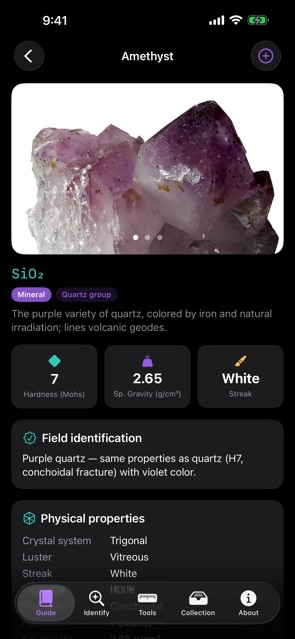
A REAL REFERENCE LIBRARY • 69 minerals and 32 rocks (igneous, sedimentary, metamorphic), each with a curated photo gallery. • Factual structured properties: Mohs hardness, streak, luster, cleavage, fracture, specific gravity, crystal system, chemical formula, diaphaneity, tenacity, magnetism and acid reaction. • Classification by mineral group plus Dana and Strunz numbers. • Formation environments, notable localities, common uses, and field-identification tips for every entry. • Search and filter by type, rock class, hardness band, and color.
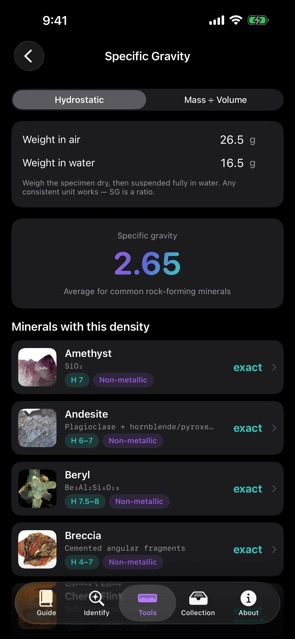
FIELD TOOLS • Mohs Scale — the ten index minerals, common field-test tools (fingernail, copper coin, steel, glass), and how to run a proper scratch test. • Specific Gravity Calculator — compute SG by the hydrostatic (Archimedes) method or mass ÷ volume, then match your result against minerals of that density. Real physics, not a lookup. • Test Reference — how to read streak, luster, cleavage versus fracture, and the acid test.
YOUR COLLECTION • Log the specimens you find with a photo, a linked field-guide entry, the locality, the date, and optional coordinates. • Record your own hardness and specific-gravity measurements. • Everything is stored locally on your device.
PRIVATE AND OFFLINE BY DESIGN • Works everywhere — the quarry, the trail, the plane — with no signal. • No account, no sign-in, no subscription. • No analytics, no tracking. Your photos and collection never leave your device.
Specimen photographs are sourced from Wikimedia Commons under public-domain, CC0, CC-BY and CC-BY-SA licenses, with full per-image attribution inside the app.
A note on photo identification: Lithify does not pretend an AI can name a rock from a single picture. Automated mineral photo-ID is unreliable, so the honest, accurate path is the dichotomous key and the diagnostic field tests — with the reference library always one tap away to confirm.
Buy it once. Own it forever. Take it anywhere.